

🚀 DPT Offshore Marine – NI DP Confirmation Letter Generator
Complete Step-by-Step Guide (Initial Application)
https://app.dynpostraining.com
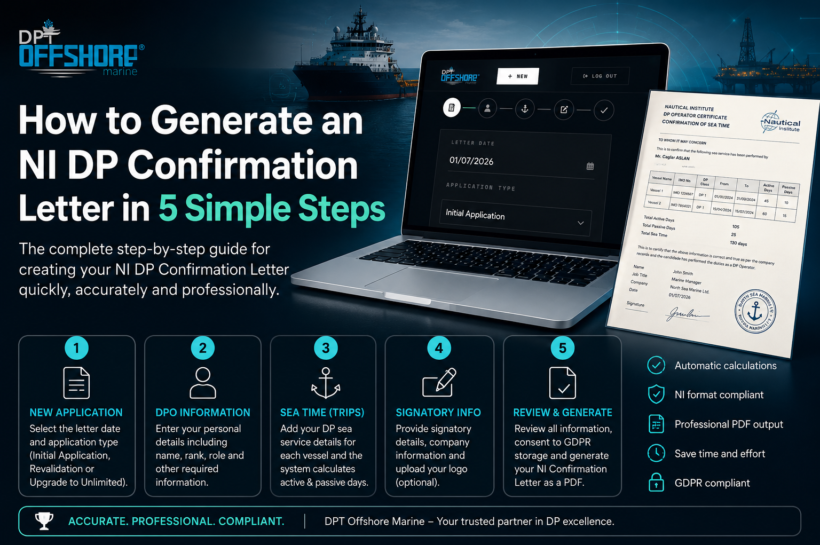
No previous experience? No problem. Follow these 5 simple steps and the system will automatically calculate your DP sea time and generate a confirmation letter matching the NI (Nautical Institute) sample format.
🟢 STEP 1 – Create a New Application
📋 Purpose: Start a new NI Confirmation Letter.
Fill in:
📅 Letter Date
- Select the date the confirmation letter will be issued.
📄 Application Type
Choose the appropriate application:
🟢 Initial Application
For candidates applying for their first DP Certificate.
https://app.dynpostraining.com
🔵 Revalidation
For renewing an existing DP Certificate.
🟣 Upgrade to Unlimited – Initial Application
For upgrading from Limited to Unlimited DP Certificate.
✅ After selecting the correct application type, click CONTINUE.
https://app.dynpostraining.com
👤 STEP 2 – Enter DPO Information
This section contains your personal information.
Complete the following fields:
👤 Gender
- Male (Mr. / His)
- Female (Ms. / Her)
🪪 DPO Full Name
- Automatically locked to the legal name registered on your NI documents.
🎂 Date of Birth
- Enter your date of birth.
https://app.dynpostraining.com
🏢 Company Name
- Name of the company issuing the confirmation letter.
⚓ DPO Rank
Examples:
- Master
- SDPO
- DPO
- Chief Officer
🎯 Role
Select your onboard role.
Examples:
- DPO
- SDPO
- Trainee DPO
https://app.dynpostraining.com
✅ Click CONTINUE.
🚢 STEP 3 – Enter Sea Time (Trips)
This is where your DP sea service is entered.
Each voyage should be entered separately.
Fill in:
🚢 Vessel Name
⚓ GRT
🆔 IMO Number
🛰️ DP Class
Choose:
https://app.dynpostraining.com
- DP Class 1
- DP Class 2
- DP Class 3
📅 From
Start date of the trip.
📅 To
End date of the trip.
👨✈️ Rank
Your rank during that voyage.
⚙️ DP Days
Enter:
https://app.dynpostraining.com
🟢 Active DP Days
🟡 Passive DP Days (if applicable)
The system automatically:
✅ Calculates total DP days
✅ Calculates passive days
✅ Checks NI requirements
✅ Prevents incorrect calculations
https://app.dynpostraining.com
➕ Need more voyages?
Simply add another trip.
The system automatically combines all sea service into one confirmation letter.
✍️ STEP 4 – Signatory Information
Enter the details of the person signing the confirmation letter.
Fill in:
👤 Signatory Name
💼 Job Title
🏢 Company Contact Details
https://app.dynpostraining.com
Example:
North Sea Marine Ltd.
Aberdeen, UK
Telephone
🌐 Website (optional)
🖼️ Company Logo (Optional)
Upload your company logo.
The logo will appear on the generated confirmation letter for a more professional appearance.
✅ Click CONTINUE.
https://app.dynpostraining.com
📄 STEP 5 – Review & Generate
Before generating the document, the system provides a complete summary.
You can instantly review:
🟢 Total Active Days
🟡 Total Passive Days
⚓ Total Sea Time
📊 Passive / Active breakdown
🚢 Number of Trips
✍️ Signatory information
https://app.dynpostraining.com
Everything is calculated automatically.
No manual calculations are required.
✅ GDPR Consent
Tick the consent box confirming storage of the confirmation letter in accordance with GDPR requirements.
🎉 Generate Your Confirmation Letter
Click:
https://app.dynpostraining.com
🚀
GENERATE & SAVE
The system will automatically:
✅ Calculate all DP sea time
✅ Verify active and passive day totals
✅ Organize all voyages
✅ Format the information correctly
✅ Generate a professional PDF
https://app.dynpostraining.com
⭐ The Final Result
Once completed, the system produces a NI DP Confirmation Letter that follows the same layout and structure as the official Nautical Institute sample confirmation letter, with all entered data automatically placed in the correct sections.
Benefits
🟢 No manual formatting
🟢 Automatic sea-time calculations
🟢 Automatic active/passive day tracking
🟢 Multiple voyage support
🟢 Company logo support
🟢 Professional PDF output
🟢 NI sample-style confirmation letter format
💡 In just five simple steps, even a first-time user can create a professional DP Confirmation Letter in minutes—without worrying about calculations, formatting, or document layout.
https://app.dynpostraining.com
(81)

Related posts:
 NI Official Confirmation Letter: The Complete Guide to Creating a Professional PDF Online (2026)
 Still Using Paper DP Confirmation Letters? Discover the Smarter Digital Alternative
 🔥 Navigating the Storm: How to Conquer the High Difficulty of the NI DP Revalidation Exam 💻
 The Nautical Institute’in Yeni DP Revalidasyon Politikası: Bilgi Güncelliği ve Yetkinlik Odaklı Bir Yaklaşım